
Whether you are rigging a terrifying boss fight for a survival horror game or animating a stylized woodland creature for an animated feature film, mastering the biomechanics of a brown bear is a major milestone for any 3D animator. Bears are unique quadrupeds; unlike horses or canines, they are heavily built, plantigrade (flat-footed) mammals with a surprising range of motion and explosive speed.

Below, we break down the top five essential animation cycles every bear rig needs, followed by a comprehensive scientific and anatomical reference guide for male, female, and baby bears.
Top 5 Essential Brown Bear Animation Cycles
To build a believable bear for film or gaming, your animation tree needs to cover the vast difference between their lumbering resting state and their terrifying top speed.
1. The Heavy Walk Cycle
- The Vibe: Lumbering, powerful, and deliberate.
- Importance for Film/Games: The walk cycle is your baseline. In games, this is the default patrol state for NPC bears. In film, it establishes weight. Bears have a “pacing” walk, meaning both legs on one side of the body move forward simultaneously. This creates a distinct side-to-side rolling motion in the shoulders and hips that is crucial to get right.
2. The Trot / Run
- The Vibe: Bouncy, focused, and closing the distance.
- Importance for Film/Games: Used as the primary “aggro” or pursuit state in video games before reaching top speed. The trot breaks the pacing walk and shifts into a diagonal support sequence. Animators must focus on the heavy jiggle of the fat and loose skin around the neck and belly to convey the mass moving at speed.
3. The Full Gallop
- The Vibe: Terrifying, explosive, and surprisingly fast (up to 35 mph).
- Importance for Film/Games: This is the high-stakes chase animation. A galloping bear uses a rotary gallop. The enormous shoulder hump (a massive muscle mass used for digging) powers the front legs, while the hind legs pull past the front legs during the airborne phase.
4. The Idle / Bipedal Stand
- The Vibe: Curious, surveying, or intimidating.
- Importance for Film/Games: Bears are one of the few large quadrupeds that frequently stand on their hind legs to get a better view or catch a scent. In games, this serves as an excellent “alert” state before transitioning into combat. For animators, the challenge is balancing the rig’s center of gravity and ensuring the spine arches correctly without breaking the mesh.
5. The Attack / Swipe
- The Vibe: Devastating, heavy, and lethal.
- Importance for Film/Games: Crucial for combat mechanics. A bear’s primary weapon is its massive front paws and non-retractable claws. The attack animation shouldn’t look like a human punch; it should look like a heavy, downward, or sweeping pendulum of pure mass.
Brown Bear Anatomy & Traits for 3D Animators
To create a believable silhouette and rig, animators must understand the distinct physical differences between male bears (boars), female bears (sows), and baby bears (cubs).
Here is your scientific and anatomical reference matrix for 3D modeling and animation:
| Feature / Trait | Male Brown Bear (Boar) | Female Brown Bear (Sow) | Baby Bear (Cub) |
| A) Dimensions (Science) | Length: 6.5 to 9.5 feet. Height (Shoulder): 3.5 to 5 feet. | Length: 5 to 7 feet. Height (Shoulder): 3 to 4 feet. | Length at birth: ~8 to 12 inches. Yearling Length: 3 to 4 feet. |
| B) Average Weight | 400 lbs to 900+ lbs (Coastal grizzlies can exceed 1,000 lbs). | 250 lbs to 600 lbs. | Under 1 lb at birth. Emerges from den at 10-20 lbs. Yearlings: 50-100 lbs. |
| C) Roles & Behavior | Solitary, highly territorial, wide-ranging. Dominant scavengers and hunters. | Protective, territorial over smaller ranges. Foragers, deeply focused on cub survival. | Playful, curious, entirely dependent on the mother. Frequently climb trees to escape danger. |
| D) Fur Color Variations | Ranges from blonde to dark brown/black. Often features “grizzled” silver-tipped hairs on the back. | Similar to males. Often appears slightly lighter in inland populations, but highly variable. | Often born with very dark fur that lightens or develops a “collar” of lighter fur around the neck that fades with age. |
| E) Sexual Dimorphism | Significantly larger overall. Much broader, blockier skull. More pronounced, massive shoulder hump. Thicker neck. | Visibly smaller with a narrower, more tapered face and snout. The shoulder hump is present but less exaggerated. | N/A (Dimorphism becomes apparent after reaching maturity at around 4-5 years old). |
| F) Top Traits for Animators | Needs secondary motion (jiggle deformers) on the neck and belly. Silhouette must be top-heavy with a massive front end. | Silhouette is slightly more balanced. Animation should feel slightly more agile and less “lumbering” than the boar. | Over-proportioned paws and ears compared to the head. Needs bouncy, less-coordinated, exaggerated animations. |
| G) Top Anatomy Facts | Plantigrade stance (heel strikes ground like a human). Non-retractable claws up to 4 inches long. | 42 teeth. Incredible sense of smell (100x stronger than a human’s) drives their head movement. | Born blind, deaf, and hairless. Claws are sharp enough to climb vertical bark immediately upon leaving the den. |

The Animator’s Guide to Brown Bear Anatomy, Behavior, and Rigging
To animate a creature convincingly, you have to understand what makes it tick from the inside out. For the brown bear, this means studying the underlying bone structure, understanding their behavioral psychology, and applying the right technical rigging solutions to bring that heavy geometry to life.
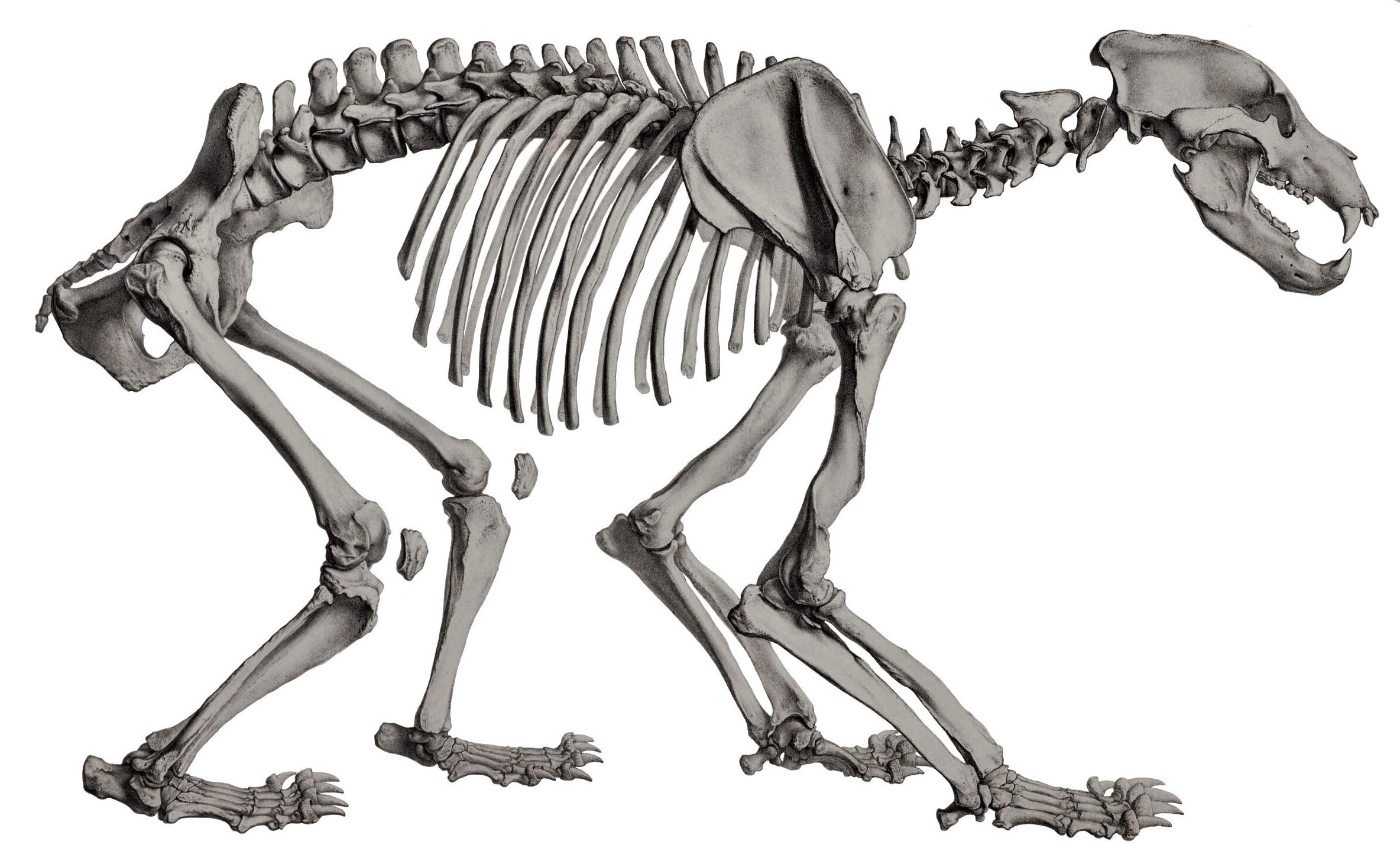
Beneath the Fur: Skull, Bite Force, and Musculature
A bear’s silhouette is defined by its massive muscles and heavy skeletal frame. Animators and modelers should focus on these core anatomical facts:

- The Skull and Bite Force: A brown bear’s skull is thick, broad, and heavily domed. Males often have a pronounced “sagittal crest” (a ridge of bone running along the top of the skull) which anchors their massive temporalis muscles. This jaw musculature gives the brown bear a terrifying bite force of roughly 975 to 1,200 PSI—strong enough to crush a bowling ball or snap a human femur.
- The Power Hump: The iconic grizzly/brown bear shoulder hump is not made of fat; it is a solid mass of muscle (specifically the rhomboid and trapezius muscles). This is the engine room of the bear, powering its front legs for digging out roots, tearing apart logs, and delivering devastating swipes.
- The Neck and Core: A bear’s neck is incredibly thick, seamlessly blending into the shoulder mass. When animating, the head should rarely snap around like a bird’s; it should swing with heavy, deliberate momentum.
Bear Behavior: Solitary Wanderers or Social Creatures?
Understanding a bear’s psychological state dictates how you pose and time your animation.
Are they social? Brown bears are primarily solitary and territorial. However, they are “facultatively social,” meaning they can tolerate each other and form temporary, complex social hierarchies when there is a massive abundance of food (like during a salmon run or at a whale carcass).

Monogamous or Polygamous? Brown bears are highly polygamous (promiscuous). Both males and females will mate with multiple partners during a single breeding season. In fact, females exhibit “multiple paternity,” meaning a single litter of cubs can have two or three different fathers. Male bears are extremely competitive and aggressive during this time, which is perfect reference material for combat animations.
The Technical Rig: Tools and Approaches
Rigging a bear requires specific technical setups to handle its unique quadrupedal/bipedal nature. Standard tools for this pipeline include Maya (the industry standard for rigging/animation), Blender (highly capable with add-ons like Auto-Rig Pro), and ZBrush (for sculpting the base mesh and muscle flow).
Key Rigging Approaches:
- The Plantigrade Foot Setup: Because bears walk flat on their heels like humans (plantigrade), their hind leg rig needs a specific reverse-foot setup. Unlike dogs or horses (which walk on their toes), a bear’s heel strike dictates the timing of the weight transfer.
- IK/FK Switching: Your leg rigs must have seamless Inverse Kinematics (IK) to Forward Kinematics (FK) switches. Use IK for grounded walk cycles to keep the paws planted, and switch to FK when the bear rears up on its hind legs to swipe.
- The “Ribbon” Spine: To transition a bear from a hunched quadruped to a towering biped, the spine rig needs a flexible, spline-based IK setup (often called a ribbon spine) to arch backward smoothly without crushing the geometry.
- Jiggle Deformers: A rigid bear looks like a plastic toy. You must implement jiggle deformers or blendshapes on the neck skin, belly fat, and shoulder hump to create secondary motion that simulates hundreds of pounds of mass reacting to gravity.
Translating Nature into Keyframes
Never animate a bear from memory. Using nature documentaries or zoo footage is mandatory. Here is how to use that reference:
- Look for the “Pacing” Walk: Watch closely as a bear walks. They use a pacing gait, meaning both the front and back legs on the same side of the body move forward at the same time. This creates their signature side-to-side lumbering roll.
- Track the Head Bob: Isolate the bear’s nose in your reference footage and track its path. You will see a heavy, rhythmic bob that counterbalances the movement of the front legs.
- Feel the Weight: Pick a specific frame in your reference where the bear’s paw hits the ground. Notice how many frames it takes for the shockwave to travel up the leg and jiggle the shoulder mass. Mimic this timing to sell the weight.
Top Sources for 3D Brown Bear Models
If you need a base model or a pre-rigged asset to start practicing your animation cycles, here are the top industry marketplaces:
- TurboSquid: The gold standard for high-end, film-ready assets. Search for “Rigged Brown Bear” to find photorealistic models with advanced hair/fur systems (XGen or standard hair).
- CGTrader: An excellent middle-ground with a vast library of both hyper-realistic and stylized bear rigs suitable for game engines like Unreal and Unity.
- ArtStation Marketplace: A great place to find independent technical artists selling highly specialized, animator-friendly rigs tailored specifically for Blender or Maya.
Conclusion: Building the Neural Connections of a Master Animator
Creating a believable, anatomically correct brown bear is not just about moving controllers on a screen; it is a holistic, multi-disciplinary pursuit.
To truly animate better, you must cross-train your brain. Sculpting teaches you where the muscle mass originates and inserts. Drawing trains your eye to capture dynamic lines of action and strong silhouettes. Rigging forces you to understand joint placement and biomechanical limits. Texturing makes you consider how skin folds and stretches over the bone.
By actively watching nature references, reading scientific anatomy papers, and practicing these diverse disciplines, you are doing more than just building a 3D model. You are building complex neural connections in your own mind. You are teaching your brain to inherently understand weight, anatomy, and physics. When you finally sit down to animate, you won’t just be posing a digital puppet—you will be breathing life into a living, breathing digital beast.
Next up: Master the gallop! 🐎✨
Check out The Ultimate Horse Reference for Animators to learn about equine gait patterns, skeletal alignment, and rigging tips!
👇 https://animalanimator.com/the-ultimate-horse-reference-for-animators/
🎨 Level up your creature work! 🚀🐾